For preschools · Pilot applications

Your school’s day, on one screen.

Attendance with QR check-in at the door, pickup permissions, the daily feed, announcements and end-to-end encrypted messaging. School management, teachers and parents use the same app, and everyone sees only what is opened to them.

  • No app store needed
  • Free for parents
  • Turkish, English, Russian, Arabic
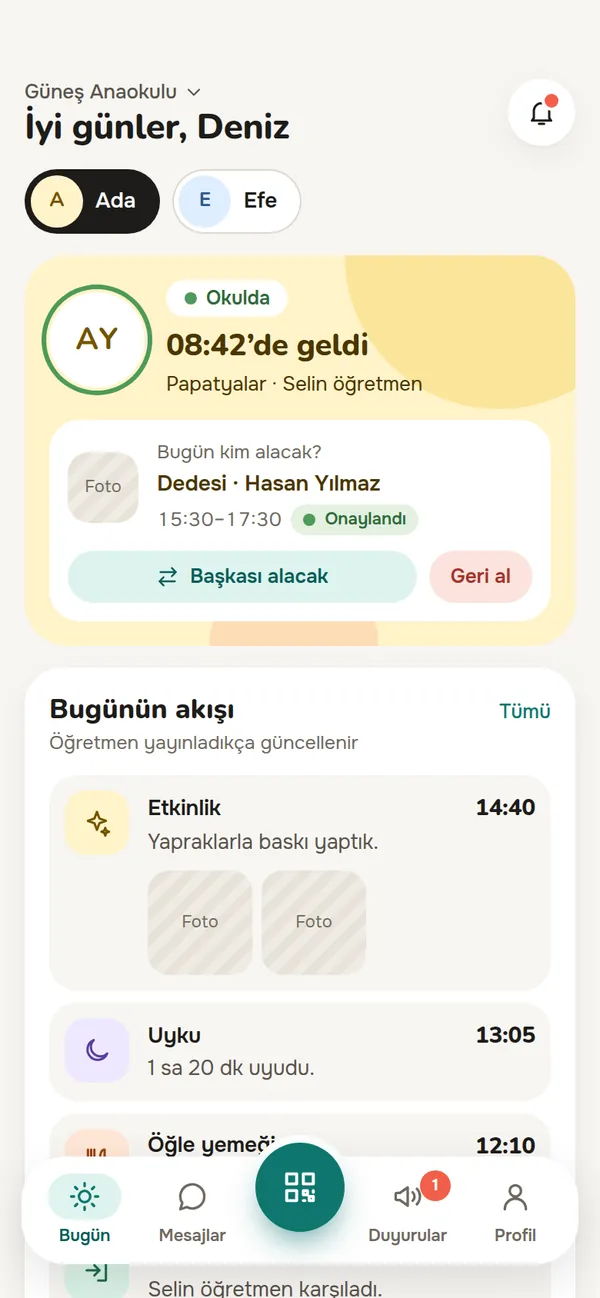
The parent app’s Today screen: when the child arrived at school, who is picking them up today, and the day’s feed.

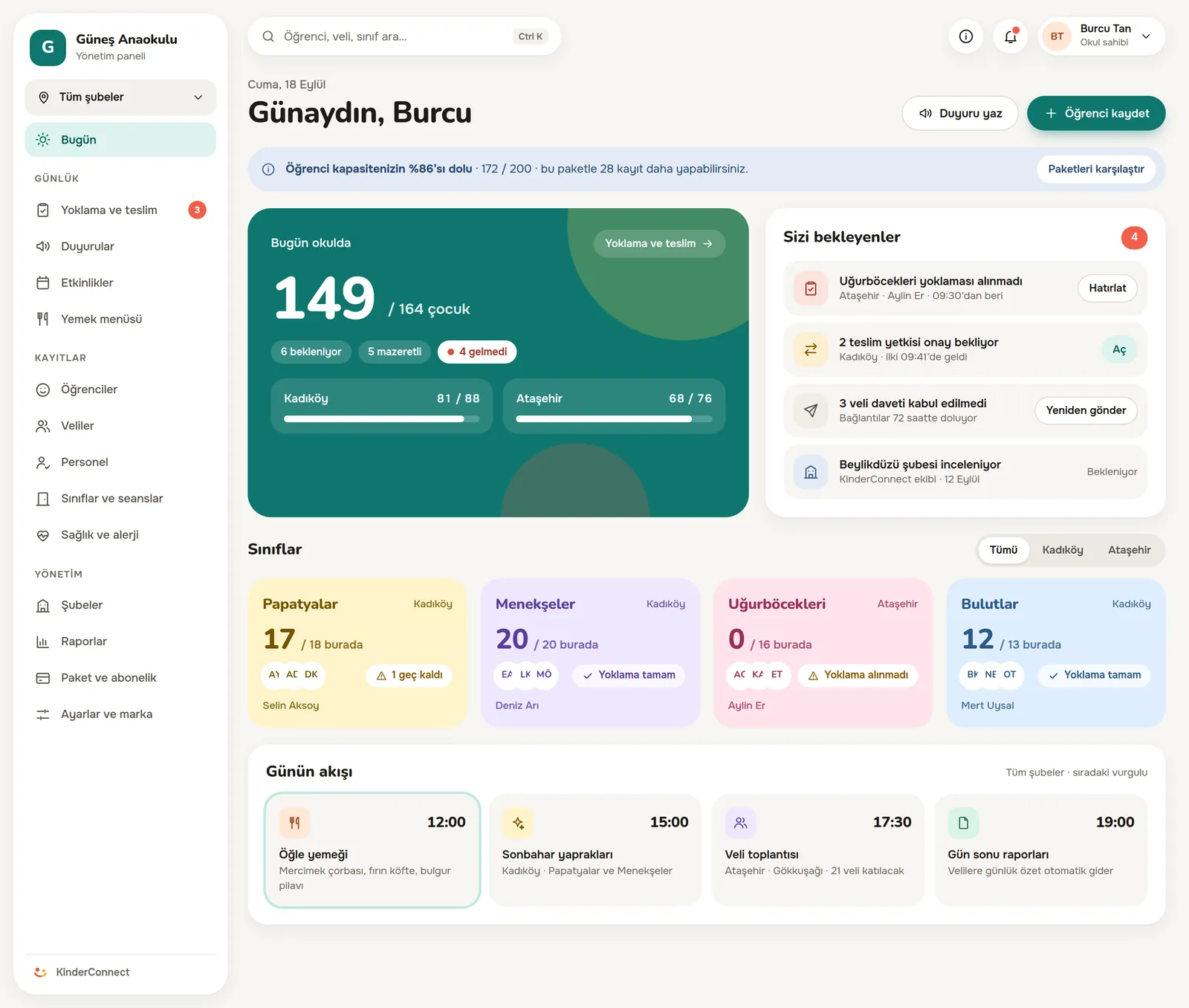
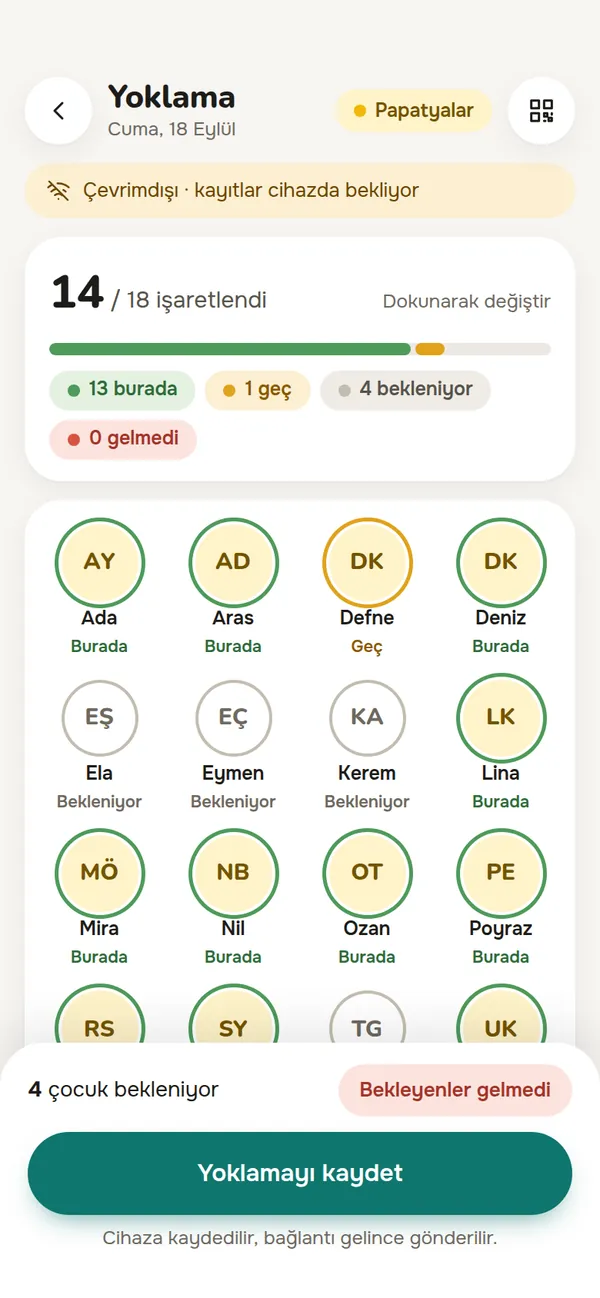
Screens are design previews, shown in Turkish; names and numbers are illustrative.

Where are we? KinderConnect is in development. The screens and the security rules are written down; we are building the software to those rules and accepting pilot school applications. Apply for the pilot

Management panel

Who came in, who didn’t, what’s waiting? At a glance.

The school owner sees every branch, a branch admin sees their own. A class without attendance, a pickup permission waiting for approval and parent invitations not yet accepted all land in one “Waiting for you” list.

The school owner’s Today screen: children in school, branch occupancy, pending tasks, colour-coded class cards and the day’s schedule.

Who it is for

Three roles, one app

School management uses the panel on a computer; teachers and parents use a simple mobile layout on their phones. It is all one web app, and each role sees only its own work.

School management

The whole day in one panel, with who-sees-what written down.

  • Attendance, occupancy and pending tasks for every branch on one screen.
  • Separate permissions per parent: pickup, health, photos, messaging.
  • Handing a child to someone not on the list needs your approval and a reason.
  • Write an announcement once; send it to a class or the whole school.
Teachers

Three screens to learn: Today, Attendance, Pickup.

  • Attendance by tapping; if the internet drops, records wait on the device.
  • The daily log is ticked, not typed: meals, naps, activities.
  • At pickup, only authorised people are listed, with their photos.
  • Your personal number stays private and your working hours are protected.

Parents

Your child’s day on your phone, and a record of who picked them up.

  • Arrival time, meals, naps and activities appear in the feed during the day.
  • Send “Grandpa is picking up today” from the app.
  • Photo consent is yours; withdraw it whenever you like.
  • No app store and no fees; sign in from the link your school sends.

Features

For every moment of a preschool day

From the morning door to the evening pickup, everything that happens at school is recorded instead of getting lost in notebooks, memory or group chats.

Attendance and QR at the door

Two seconds at the door, one row in the panel.

The parent scans the code at the door and the child shows as “arrived” at that moment. The teacher marks the rest by tapping and reports absences with one tap. A class whose attendance has not been taken shows up as an alert in the management panel.

  • The QR code only marks “arrived”; there is no location tracking.
  • The notification sent to the parent never contains the child’s name.
The teacher’s attendance screen: 14 of 18 children marked; present, late and expected shown with coloured rings.

Pickup and pickup permissions

Pickup is the riskiest twenty minutes of the day.

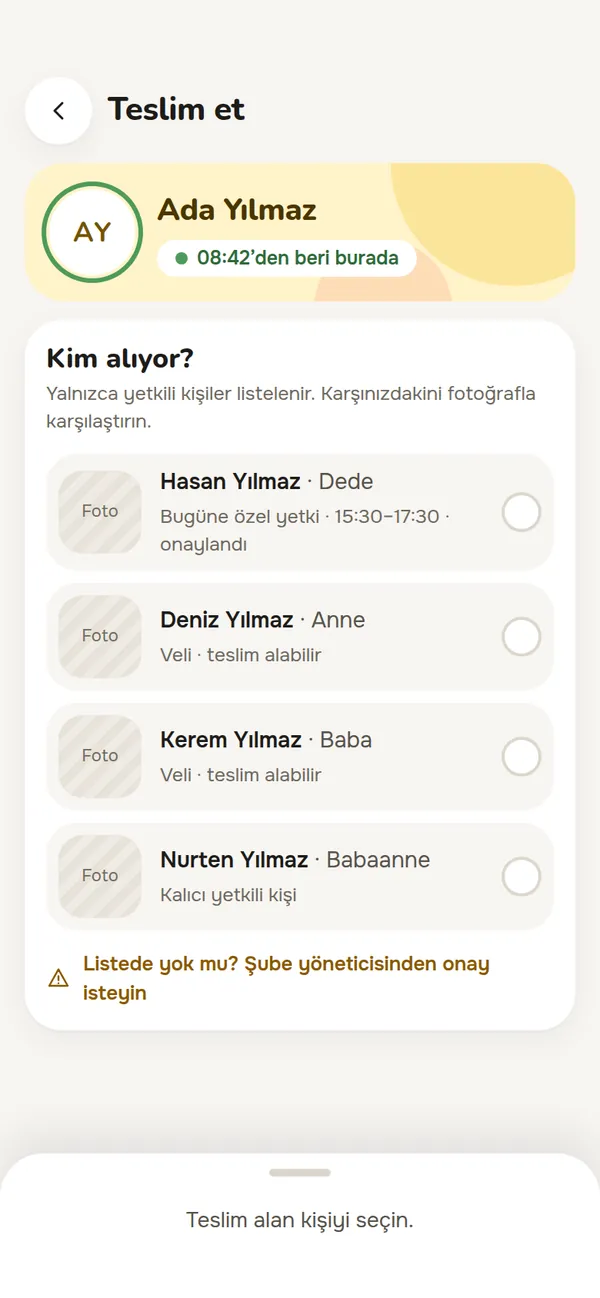
The teacher’s screen lists only the people allowed to collect that child, with their photos. If someone not on the list turns up, the handover stops; an exception needs the branch admin’s approval and a written reason. Who took the child, when, and from which teacher is recorded.

  • At the door, it is the system that says “no”, not the teacher.

“Grandpa is picking up today”

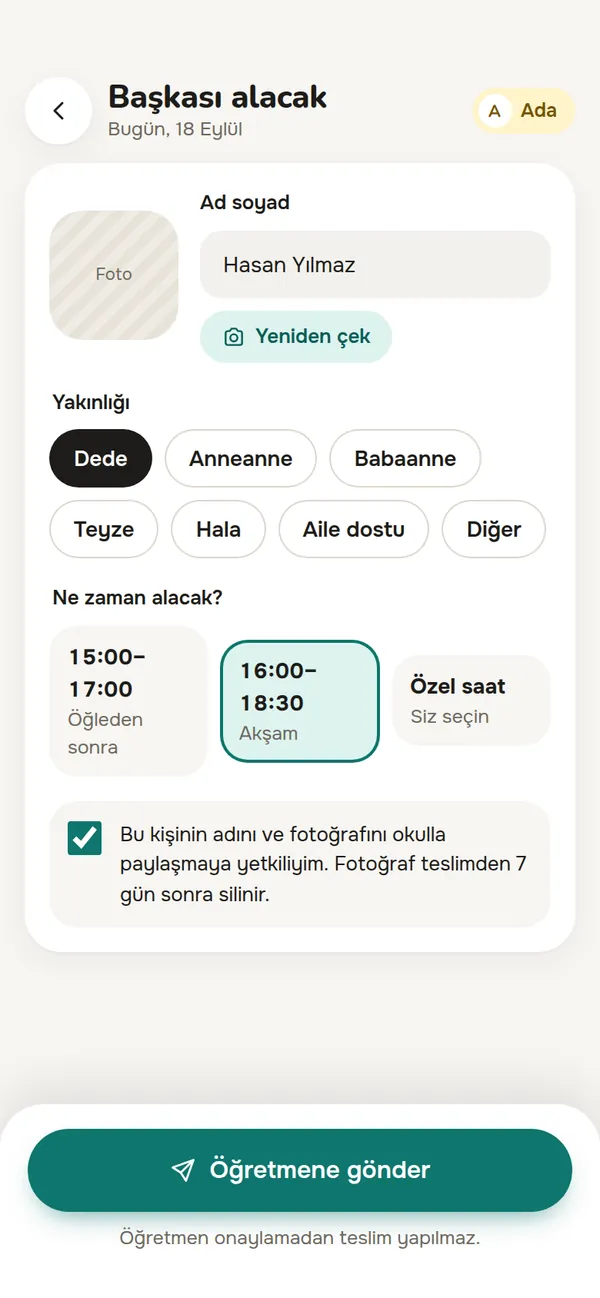
The parent sends the name, relationship, time window and a photo from the app. No handover happens until the teacher approves; the permission ends at the end of the day and the photo is deleted 7 days after pickup.

The teacher’s pickup screen: four people allowed to collect the child, each with a photo slot, and a link to ask the branch admin when someone is not on the list.
The parent’s “Someone else is picking up” screen: name, relationship, time window and a declaration about sharing the photo, with the note that no handover happens without the teacher’s approval.

Daily feed and photo consent

No child is shared in a photo without their parent’s permission.

Teachers tick meals, naps and activities in a few taps; parents follow the day as a feed. When a photo is uploaded the children in it are tagged, and if one of them has no consent, sharing stops. No blurring, no cropping.

  • Parents can withdraw consent in the app at any time, and it takes effect immediately.
  • Photos are never sent to any group chat; they only open inside the app.
Illustrative screen: the teacher tags the children when uploading, and consent is checked before anything is shared.

Health and allergies

Health information never opens without a reason.

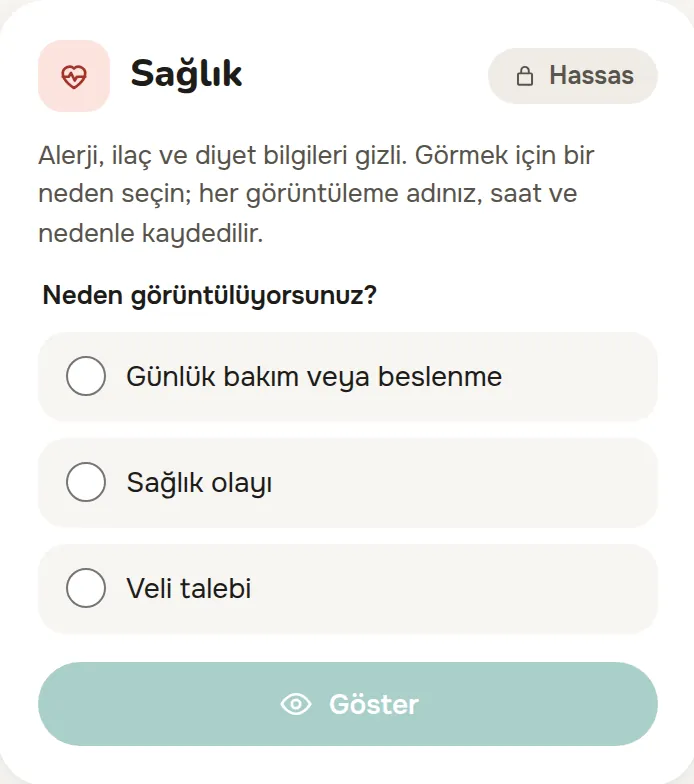
Allergies, medication and diet stay closed on screen. Staff who need them first choose why: daily care, a health incident or a parent request. Who opened them, when and why is recorded.

  • Health information is stored encrypted in the database.
  • Only the child’s teacher, the branch admin and an authorised parent can see it.
The health card on the student detail screen: allergy, medication and diet details are hidden; to view them, one of “Daily care or meals”, “Health incident” or “Parent request” must be chosen.

End-to-end encrypted messaging

Messages between teacher and parent that only the two of them can read.

Teacher–parent messages are encrypted on the device and only the people in the conversation can open them; neither KinderConnect nor school management can read the content. The teacher’s personal number is never shared, and the conversation stays in the school’s app.

  • In the class channel the teacher writes and parents read. There is no parent-to-parent chat.
  • Messages written outside working hours are delivered; the teacher is notified when working hours begin.
  • Parents do not see read receipts, so teachers are not pressured to reply instantly.
Illustrative screen: a teacher–parent conversation. Names are illustrative.

Offline attendance

Records don’t get lost. They wait.

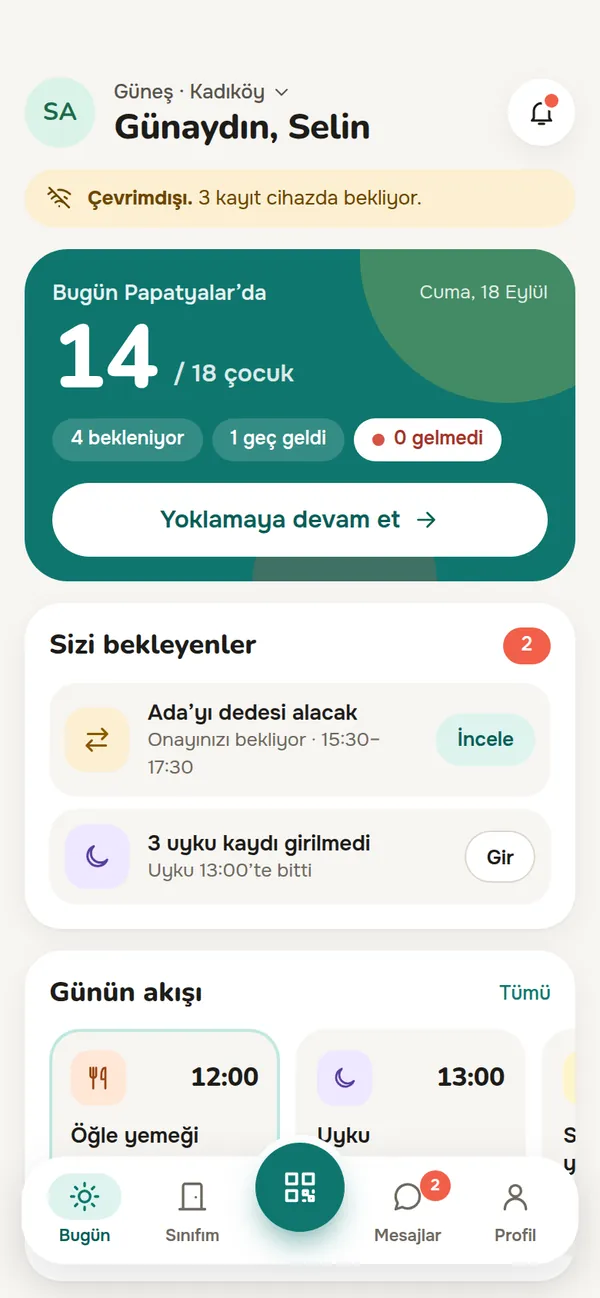
If the school’s internet drops, the teacher keeps marking attendance and the daily log. Records wait on the device, encrypted, and the top of the screen shows how many are waiting. When the connection is back they are sent automatically while the app is open.

  • Records waiting on the device are deleted on sign-out and when switching schools.
The teacher’s Today screen: the alert “Offline. 3 records waiting on the device.”, 14 of 18 children in class, a pickup permission waiting for approval and the day’s schedule.

And the rest of the day

Announcements don’t get lost in a group chat

Send an announcement to one class or the whole school. Drafts and published posts are separate, attachments stay inside the announcement, and you see how many parents it reached.

Built for multiple branches from day one

The school owner sees every branch on one screen; a branch admin sees only their own. A new branch is one more row in the list.

Not every parent is the same

Pickup, delegating pickup, health, photos and messaging are switched on separately for each parent. Parents cannot raise their own permissions, and every change is recorded.

No app store, one-tap install

KinderConnect is an installable web app for every role. It opens in the browser, can be added to the phone’s home screen, and updates arrive on their own.

No names in notifications

Notifications arrive as web push and stay generic, like “Your child’s daily log was updated”. On iPhone, the app must be added to the home screen to receive them. No SMS is sent.

Everyone reads in their own language

The app is being prepared in Turkish, English, Russian and Arabic. In Arabic, the screen runs right to left.

Security and KVKK

No big words. We list our decisions one by one.

Your child’s information is not just “protected” with us; it is limited: who can open it, where it is kept and when it is deleted are each written down.

Sensitive fields and every file encrypted

ID numbers, phone numbers, addresses and health information are encrypted field by field with AES-256-GCM. Every photo and document is encrypted with its own key; there are no public links, and files open only inside the app after a permission check.

Schools are kept apart

Each school’s data is kept separate; its sensitive fields and files are encrypted with a key of its own. Which school you are in comes only from your signed-in session; an attempt to reach another school’s record gets a “no such record” answer. No release ships without passing cross-school access tests.

Message content is end-to-end encrypted

Only the people in a teacher–parent conversation can open its messages. KinderConnect and school management cannot read the content; the server sees only who wrote to whom, and when.

Every look leaves a record

Who opened health information, when and for what reason is recorded. KinderConnect’s system administrator has read-only access to school data, sees sensitive fields masked, and every look is recorded with its reason.

Data stays in the European Union region

Data is stored on Cloudflare infrastructure in the European Union jurisdiction. Under KVKK this is a transfer abroad, based on the standard contract. Real school data is not processed until that process is complete.

The school is the data controller

For student and parent data, the school is the data controller; KinderConnect’s intended role is a data processor acting on the school’s instructions. We never sell personal data or use it for advertising or profiling.

We don’t promise absolute security.

Instead, we write down each measure. If we detect a data breach we inform your school without delay, and the school, as data controller, informs you and the Turkish Data Protection Board.

Pricing

Fixed price, no surprise invoices.

Packages differ by the number of students, branches and staff. Prices will be settled during the pilot; we prepare an offer for your school.

Starter

For small, single-branch schools.

up to

  • 60students
  • 1branch
  • 10staff

Ask us for a quote

Request a quote

Campus

For campuses and school groups.

up to

  • 600students
  • 10branches
  • 90staff

Ask us for a quote

Request a quote

In every package

  • No overage fees
  • No per-message fees
  • Price fixed for the term
  • Free for parents
  • Warnings at 80% and 95% before the limit
  • Export your records whenever you like

We don’t hold you hostage with your data.

You can export your records at any time. After the subscription ends, your data waits 90 days before deletion; we put this in the contract.

We don’t offer a free trial; instead, we agree on a pilot period with a written duration and scope.

FAQ

Frequently asked questions

The questions we hear most from schools and parents. If yours is not here, write to destek@kinderconnect.app.

Parents ask

Who can see my child’s photos?

Only the child’s class teacher, the branch admin and parents with photo permission. Photos are stored encrypted, have no public link and only open inside the app.

I don’t want my child’s photo shared. What happens?

Without your consent, no photo that includes your child is shared. We don’t blur or crop, because that can go wrong; the photo is simply not published. You can give consent later or withdraw it at any time, and withdrawal takes effect immediately.

Where is our data kept? Does it leave Turkey?

Yes, it is kept abroad, and we say so openly. Data is stored on Cloudflare infrastructure in the European Union jurisdiction; we have no servers in Turkey. The legal basis for this transfer is the standard contract provided for under KVKK. Sensitive fields and all files are encrypted.

Can the head of school read my messages with the teacher?

No. Teacher–parent messages are end-to-end encrypted; neither school management nor KinderConnect can read the content. If you choose to forward a message to school management, only that message’s content is shared, with your explicit approval.

What if I forget my chat passphrase?

Your messages are protected by a chat passphrase that only you know, and there is no way to recover it. You can set a new passphrase, but older messages then stay unreadable. This is shown clearly when you create the passphrase.

Will notifications show my child’s name?

No. A notification says something general like “Your child’s daily log was updated”; it never contains the child’s name, message text or health information. The details are only inside the app. No SMS is sent.

Where do I download the app?

Not from an app store. Open the link your school sends in your browser and install it on your phone with “Add to Home Screen”. On iPhone, notifications only work after adding the app to the home screen (iOS 16.4 or later). You can also use it on a computer.

We live apart. What can the other parent see?

Permissions belong to each parent’s relationship with the child, not to the person. Pickup, health information, photos and messaging are switched on and off separately. Only school management can change them; no parent can raise their own permissions, and every change is recorded.

Grandpa is picking up my child today. What do I do?

In the app, enter his name, relationship, time window and a photo, and send it to the teacher. No handover happens until the teacher approves. The permission ends at the end of the day; only the teacher and the branch admin see the photo, and it is deleted 7 days after pickup.

Do we pay for the app?

No. Parents pay no app fee; the school is the one invoiced.

How long is our data kept?

A child’s data is permanently deleted one year after they leave or graduate. Messages are deleted after two years. A photo sent for pickup is deleted 7 days after the pickup.

Will we be told about a data breach?

Yes. We don’t promise absolute security; if we detect a breach we notify your school without delay. As data controller, the school notifies the Turkish Data Protection Board and you.

Schools ask

How much does it cost?

Package prices are not final yet, and we don’t want to quote a made-up number. The structure is clear: fixed-price packages with student, branch and staff limits, and no overage or message fees. We prepare an offer for your school.

Is the product ready? When can we start?

KinderConnect is in development. The screen designs and the security and data rules are written down, and we are building the software to those rules. Instead of a firm date we give you an order of work and share progress regularly. If you would like to be a pilot school, request a demo.

Is there a free trial?

No, and we say so up front. Instead, we walk through the screens with you end to end and agree on a pilot period with a written duration and scope.

Our teachers are not comfortable with technology.

We kept the teacher side deliberately narrow: Today, Attendance and Pickup. Attendance is marked in bulk, the daily log takes a few taps, and pickup means matching the person with the photo on screen. We set up the first class together with you.

A WhatsApp group is free. Why pay for this?

WhatsApp is a good chat tool, but it was not made for keeping records. In KinderConnect, who collected a child, when and from which teacher is recorded; for separated families you set who sees what, one by one; and the child of a family that did not consent never appears in a photo. The teacher’s personal number is not shared either.

Who is responsible under KVKK?

For student, parent and staff data, the school is the data controller. KinderConnect’s intended role is a data processor acting on the school’s instructions; the roles and responsibilities are set out in the data processing agreement. We list every sub-processor and technical measure on the KVKK for schools page.

Can our data get mixed up with another school’s?

This is the product’s strictest rule. Each school’s data is separated both in the application layer and in the database relations; its sensitive fields and files are encrypted with a key of its own. Which school you are in is read only from the verified session, never from the address or the request. No release ships unless the cross-school access tests pass.

Can your team see our student data?

KinderConnect’s system administrator has read-only access to school data and cannot change any record. Health, ID and contact details appear masked, and every look is recorded with a reason. The content of teacher–parent messages is end-to-end encrypted; KinderConnect and school management cannot read it.

Can we, as a school, monitor messages?

You cannot read the content; that is the result of end-to-end encryption, and it should be stated clearly in the school’s privacy notice. The rules are yours, though: working hours, message limits and, when needed, a time-limited restriction on a parent’s messaging with a written reason. If someone in a conversation forwards a message to you, its content is shared with their approval.

What happens to our data if we leave?

You can export your records at any time; this is a standing feature of the product, not a gesture at the moment you leave. After the subscription ends, your data waits 90 days and is then permanently destroyed.

What if our student numbers grow?

You see a notice when your package reaches 80% and a warning at 95%. When the limit is reached, new enrolments stop and an upgrade link appears on screen; upgrading opens the limits immediately. The price of the package you bought stays fixed for the term.

How do we move our existing records?

Honest answer: an automatic import tool is not in our plan right now. We plan the move of student, parent and staff records together with you, based on the format of your data.

Can we use our own logo and colour?

The school name, logo and primary colour appear inside the app. If the colour you choose fails the readability check, the system suggests the nearest suitable shade. The app icon and name are the same for everyone.

Demo and pilot application

Let’s walk through your school together.

Fill in the form and we will walk through the screens using one day at your school. You can also apply to become a pilot school here.

What happens next?

  1. We reply by e-mail and set up a call.
  2. We show the screens through one day at your school.
  3. If it is a fit, we agree on the pilot’s duration and scope in writing.

Prefer to write directly?

destek@kinderconnect.app

Demo request form

Number of branches, the system you use today, or anything you would like to know.

Your details are used only to reply to this request and are deleted after 180 days. This is not a consent statement.